
Updated:
April 29, 2026
Published:
April 29, 2026
Integrating Google Maps: iframe & API simply explained
Integrating Google Maps can significantly enhance the user experience on your website or in your app. It's not just a way to display a location, but also to offer interactive features like route planning, multiple locations, and custom markers. In this article, we'll show you how to integrate Google Maps into your digital platform in various ways – from a simple iframe solution to a customized API integration.
1. Google Maps Integration Options
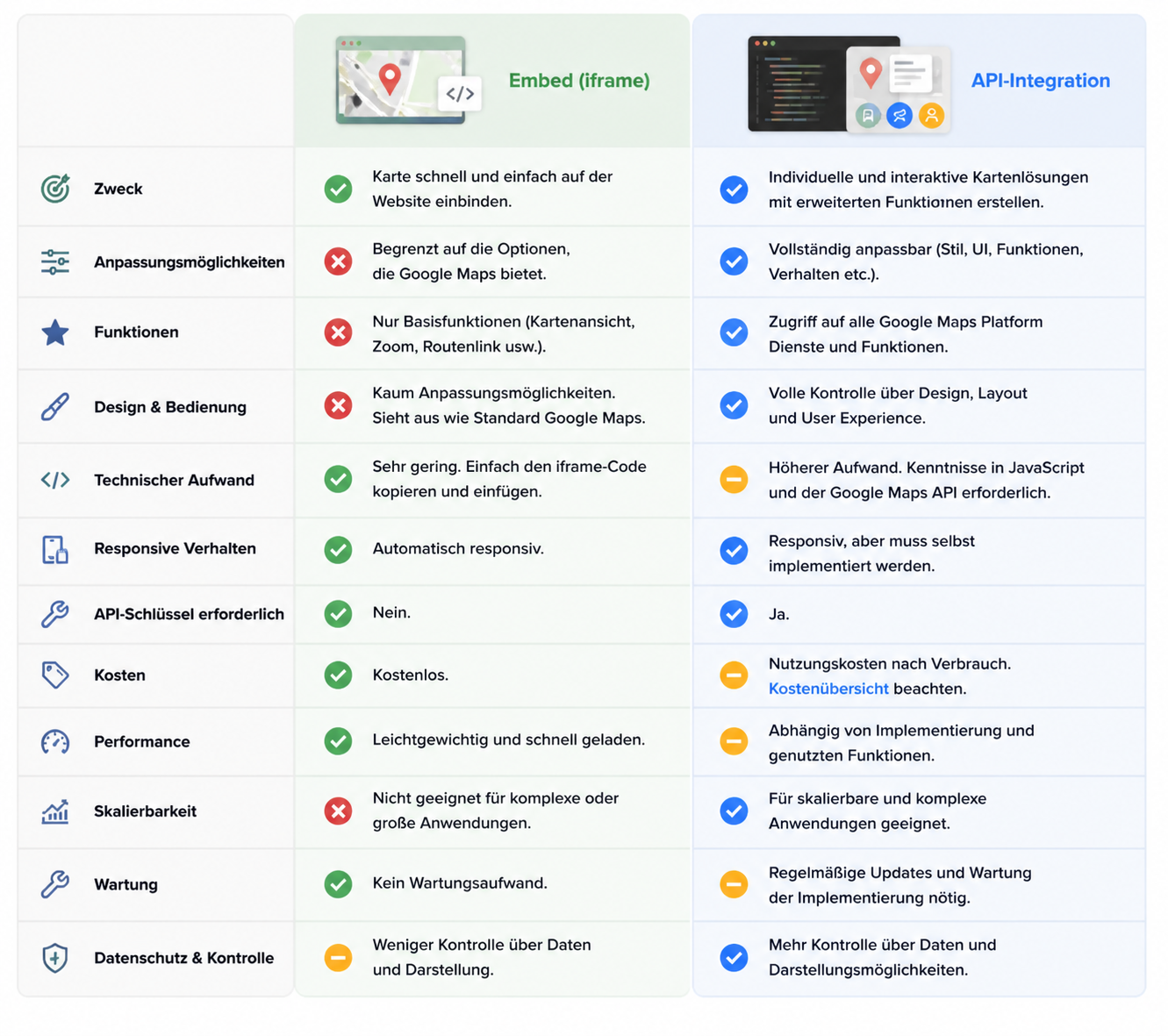
There are various ways to integrate Google Maps into your website or app, depending on your requirements and the desired range of functions. The two most common methods are embedding Google Maps via an iframe and using the Google Maps API. Both approaches have their own advantages and challenges, which we will explain in more detail below.
Google Maps Embed (iframe)
The simplest way to integrate Google Maps into a website is via an iframe. This is a quick solution where you simply copy the embedded HTML code from Google Maps and paste it into your webpage. It's ideal if you only want to display a single location.
Benefits:
- No technical knowledge required
- Quick to integrate
- Free
Disadvantages:
- Limited customization options
- No interactive use (e.g., no custom markers or route planning)
Google Maps API
The Google Maps API is designed for complex requirements. It allows you to customize Google Maps, add interactive features like route planning, and make many other adjustments.
Advantages:
- High flexibility and customizability
- Interactive features like markers, routes, and layers
- Ideal for mobile apps and dynamic websites
Disadvantages:
- Requires technical knowledge
- API key required
2. Embedding Google Maps – The Easy Way (iframe)
Embedding Google Maps via an iframe is the simplest and quickest way to do it. Here's a step-by-step guide on how to do it:
- Open Google Maps and search for the location you want to display.
- Click on "Share" and go to the "Embed map" tab.
- Copy the HTML code that is displayed.
- Paste this code into the HTML section of your website.
3. Google Maps API – Advanced Integration
For those who want more control over the map's appearance and functionality, the Google Maps API is the right choice. You can add custom markers, create info windows, and even integrate route planning.
What is an API?
An API (Application Programming Interface) allows software systems to communicate with each other. If you want to learn more about what an API is, check out our article was ist eine REST API .
Get an API Key
- Sign in to the Google Cloud Platform.
- Create a new project.
- Enable the Google Maps API.
- Create your API key.
Integration Example
For simple iframe integration, you don't need any JavaScript code. Instead, you can use the following HTML code:
Html code
Paste this code into the HTML section of your page to integrate a map of Berlin. You can adjust the URL of the src attribute to display a different map or location.
4. Practical Use Cases
Google Maps offers numerous practical applications that can improve the user experience and increase interactivity on your website or in your app. Whether on a contact page, when displaying multiple locations, or in mobile apps, Google Maps can be used in various ways to provide users with helpful features. Here are some common use cases:
Contact Page
The most common use of Google Maps is on contact pages to display a company's location. This helps users find their way more quickly and builds trust.
Multiple Locations
If your company has multiple branches, you can display them on an interactive map. This allows users to see all locations at a glance and navigate directly to the desired branch.
Route Planning and Navigation
Google Maps can help you integrate interactive route planning for events, conferences, or functions.
Mobile Apps
In apps, integration is often even more crucial:
- Track live positions
- Offer location-based services
- Display dynamic maps
5. Benefits for SEO and UX
Integrating Google Maps offers benefits not only for user experience (UX) but also for your SEO strategy:
- Improved local visibility: Google ranks businesses that display their locations on Google Maps higher.
- Better user engagement: The interactive map offers users a useful feature that extends their interaction with your website.
- Lower bounce rates: Users stay on the page longer if they can plan their route.
6. Costs, Usage & Limits
Using Google Maps is not free, but there is a generous quota of $200 per month for API requests. Once this limit is exceeded, charges apply.
When do costs apply?
- $200 per month is free.
- After that, billing is based on the number of API requests.
7. Best Practices & Common Mistakes
Integrating Google Maps requires not only choosing the right method but also adhering to best practices to ensure optimal performance and security. Here are some important best practices and common mistakes you should avoid to optimize integration and prevent problems.
Secure API Key
Protect your API key by restricting HTTP referrers so that only domains authorized by you have access to it.
Optimize Performance
- Load the Google Maps map only when it is visible (Lazy Loading).
- Reduce unnecessary API requests to improve loading speed.
Fallback Options
If Google Maps doesn't load, display static map images or alternative text descriptions.
Conclusion - Which Method Suits You?
Integrating Google Maps can add significant value to your website or app. Whether you need a simple map for location display or want to integrate an interactive solution for route planning and multiple locations, Google Maps offers numerous possibilities. For simple applications, embedding via an iframe is often sufficient, while the Google Maps API offers advanced customizations and greater flexibility. Choose the appropriate solution based on your requirements and technical capabilities to improve the user experience and functionally expand your website or app.
knguru
We put this into practice in real projects.
100+ projekte eigene App mit 50.000 nutzern
4. Praktische Anwendungsfälle
Google Maps bietet zahlreiche praktische Anwendungsmöglichkeiten, die die Nutzererfahrung verbessern und die Interaktivität auf deiner Website oder in deiner App steigern können. Ob auf einer Kontaktseite, bei der Anzeige mehrerer Standorte oder in mobilen Apps, Google Maps lässt sich auf verschiedene Arten nutzen, um den Nutzern hilfreiche Funktionen zu bieten. Hier sind einige gängige Anwendungsfälle:
Kontaktseite
Die häufigste Nutzung von Google Maps ist auf Kontaktseiten, um den Standort eines Unternehmens anzuzeigen. Dies hilft Nutzern, sich schneller zurechtzufinden und fördert Vertrauen.
Mehrere Standorte
Wenn dein Unternehmen mehrere Filialen hat, kannst du diese auf einer interaktiven Karte anzeigen. So können Nutzer alle Standorte auf einen Blick sehen und direkt zur gewünschten Filiale navigieren.
Routenplanung und Navigation
Google Maps kann dir helfen, eine interaktive Routenplanung für Events, Konferenzen oder Veranstaltungen zu integrieren.
Mobile Apps
In Apps ist die Integration oft noch wichtiger:
- Live‑Positionen tracken
- Standort‑basierte Dienste anbieten
- Dynamische Karten anzeigen
5. Vorteile für SEO und UX
Die Integration von Google Maps bietet nicht nur Vorteile für die Benutzererfahrung (UX), sondern auch für deine SEO-Strategie:
- Verbesserte lokale Sichtbarkeit: Google bewertet Unternehmen, die ihre Standorte auf Google Maps anzeigen, höher.
- Bessere Benutzerbindung: Die interaktive Karte bietet den Nutzern eine nützliche Funktion, die ihre Interaktion mit deiner Website verlängert.
- Niedrigere Absprungraten: Nutzer bleiben länger auf der Seite, wenn sie ihre Route planen können.
6. Kosten, Nutzung & Limits
Die Nutzung von Google Maps ist nicht kostenlos, aber es gibt ein großzügiges Kontingent von 200 $ pro Monat für API‑Anfragen. Sobald dieses Limit überschritten wird, fallen Gebühren an.
Wann fallen Kosten an?
- 200 $ pro Monat sind kostenlos.
- Danach erfolgt die Abrechnung je nach Anzahl der API‑Anfragen.
7. Best Practices & Häufige Fehler
Die Integration von Google Maps erfordert nicht nur die Auswahl der richtigen Methode, sondern auch die Beachtung bewährter Praktiken, um eine optimale Leistung und Sicherheit zu gewährleisten. Hier sind einige wichtige Best Practices und häufige Fehler, die du vermeiden solltest, um die Integration zu optimieren und Probleme zu verhindern.
API‑Schlüssel absichern
Schütze deinen API‑Schlüssel, indem du HTTP‑Referer einschränkst, sodass nur von dir autorisierte Domains Zugriff darauf haben.
Performance optimieren
- Lade die Google Maps Karte nur, wenn sie sichtbar ist (Lazy Loading).
- Reduziere unnötige API‑Anfragen, um die Ladegeschwindigkeit zu verbessern.
Fallback‑Optionen
Wenn Google Maps nicht lädt, zeige statische Kartenbilder oder alternative Text‑Beschreibungen an.
Fazit - Welche Methode passt zu dir?
Die Integration von Google Maps kann deiner Website oder App einen erheblichen Mehrwert verleihen. Ob du nun eine einfache Karte für die Standortanzeige benötigst oder eine interaktive Lösung für die Routenplanung und mehrere Standorte integrieren möchtest, Google Maps bietet zahlreiche Möglichkeiten. Für einfache Anwendungen reicht oft das Einbetten über ein iframe, während die Google Maps API fortgeschrittene Anpassungen und eine größere Flexibilität bietet. Entscheide dich je nach deinen Anforderungen und technischen Möglichkeiten für die passende Lösung, um das Nutzererlebnis zu verbessern und deine Website oder App funktional zu erweitern.




Zwischen Agenturalltag und Startup - unser Blog
In our blog we share tips on app development, startups and a few wild stories from everyday agency life.




Your 30-minute meeting with real experts.
Whether it's an idea or an existing app – we'll tell you honestly where you stand. All of this is free, based on experience from over 200 projects and our own app with 50,000 users. Book your meeting now and get to know us!

Oops! Something went wrong while submitting the form.