Updated:
January 13, 2026
Published:
January 13, 2026
Push notifications in apps: Architecture, APNs & FCM explained
Push notifications have long been an integral part of modern app architectures. They make it possible to reach users specifically and in real time — whether for reactivation, for relevant system information or to trigger individual events. Used correctly, push messages not only improve user loyalty, but also the efficiency of app communication. But behind the seemingly simple function lies a complex technical system.
In this article, we look at push notifications from a developer perspective: from architecture to integration to best practices for iOS, Android, and cross-platform apps.
How do push notifications work technically?
Push notifications are based on an event-driven model. Instead of the app regularly asking the server for new data (polling), the device actively receives a message from the system as soon as an event requires it. This mechanism reduces energy consumption and ensures greater efficiency in communication between server and device.
The basic architecture is as follows:
- The app registers with the respective operating system (iOS or Android) for push notifications.
- The system issues a device token that uniquely identifies the device.
- The app sends this token to its own backend.
- As soon as a message is to be sent, the backend transfers the message text and token to the push service (e.g. FCM or APNs).
- The push service takes over delivery to the respective device.
Push messages can be visible (notification), but can also be processed invisibly in the background (silent push), for example to synchronize data or prepare updates.
Comparing push systems: Android vs. iPhone
iPhone push notifications (APNs)
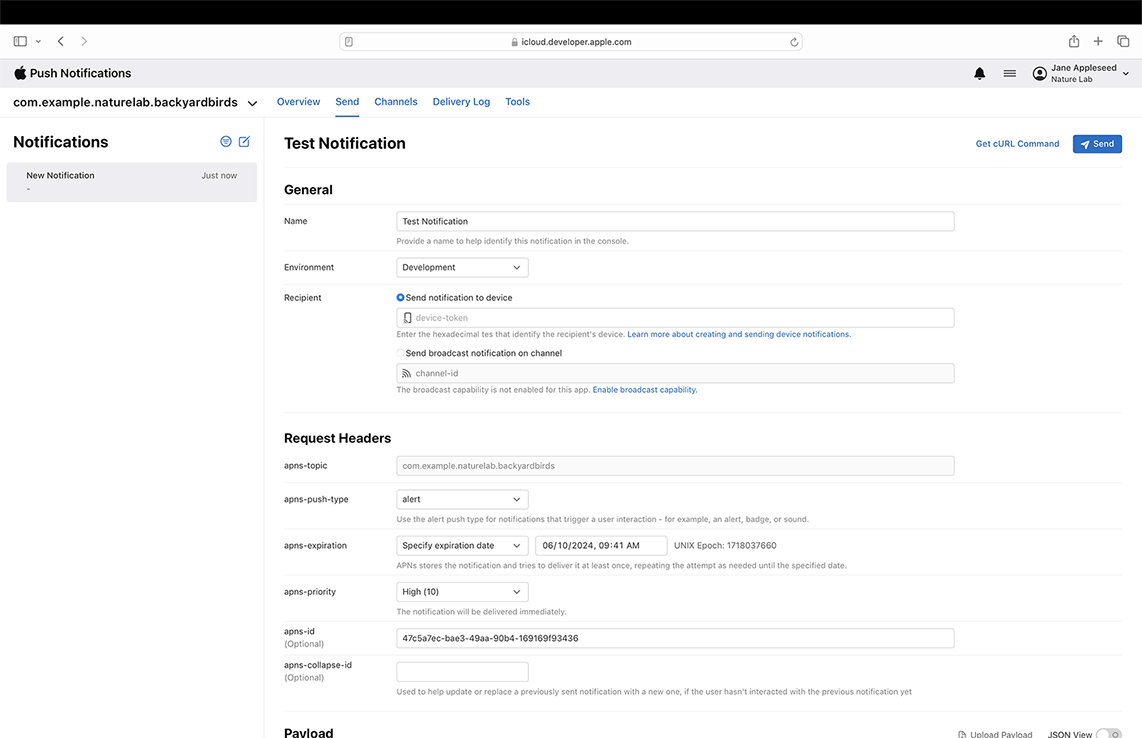
The push notification on the iPhone is handled via the Apple Push Notification Service (APNs). This uses a token-based system, in which each device receives a unique token that is used for delivery. In contrast to Android, iOS requires an explicit opt-in — no push message may be received without the user's active consent.
Communication with APNs is carried out using an encrypted HTTP/2 protocol. Developers must configure an appropriate certificate or JWT to send messages. The maximum payload size is 4 KB. In addition to classic notifications, Apple also allows so-called “silent pushes”, which do not display a notification but trigger background processes — for example to update data.
Push notifications on the iPhone are subject to strict system policies. If the function is misused — for example due to too many or irrelevant messages — many users deactivate it directly in the system settings. Developers should therefore not only implement in a technically clean manner, but also pay attention to clear added value.
Push messages on Android devices (FCM)
Push messages on Android run on Firebase Cloud Messaging (FCM), Google's official messaging service. Integration is relatively uncomplicated: The Firebase SDK handles token management, delivery and, optionally, topic messaging.
A big difference to iOS: Android does not require an explicit opt-in for push notifications — at least technically. However, from a UX perspective, it is advisable to transparently inform users what pushes are used for. Android allows fine-grained control over which types of messages are sent and how they are displayed via notification channels.
Android is often more reliable when it comes to delivery, especially in the background. However, restrictions may occur as a result of aggressive energy optimization by individual manufacturers. In such cases, manual whitelisting of the app or targeted workarounds at code level is worthwhile.
Client-side integration: Tokens, States & UX
Client-side integration starts with a permission prompt. This is optional for Android, but mandatory for iOS. Developers should choose the ideal time to query — not directly at app launch, but context-based, for example after onboarding or with a feature that clearly explains why pushes are helpful.
After approval has been given, the device token is generated and must be securely transferred to the app backend. This is usually done via a secure HTTPS connection and is linked to the user account there.
The decisive factor is how the app reacts to notifications:
- In the foreground: Push is often not automatically displayed — developers must adapt the UI themselves.
- In the background: The operating system automatically displays the notification.
- When the app is closed: The system service takes over completely.
Android also requires the definition of notification channels, iOS uses notification categories. Both help to implement user preferences in a technically correct way.
Backend architecture: delivery, error handling & segmentation
A stable push system requires a robust backend. The following aspects should be considered:
Token management
Device tokens have a limited validity period and are subject to change. If there are error codes such as invalidRegistration or NotRegistered, tokens should be removed from the database. Automated routines help clean up outdated tokens regularly.
Retry mechanisms
Deliveries can fail — for example, if the network connection is poor or notifications are disabled. A retry system with exponential backoff avoids unnecessary server load and increases the success rate.
Segmentation & Targeting
Pushes should never be sent “to everyone.” Instead: segment users, personalize content, incorporate context. This significantly increases relevance and interaction rate.
Such a setup is particularly important in the Cross platform app developmentbecause it ensures consistent results across multiple platforms.
Activate privacy & push notification: What developers need to know
Even though the topic is often pushed back to the product team, developers share responsibility when it comes to data protection and user control. With iOS, push notifications can only be activated with consent. Android technically allows more — but the GDPR also applies here.
That's why:
- Cleanly document push opt-in (consent management)
- Don't transfer sensitive data in the payload
- When deactivated: delete tokens on the server side
- No secret “silent tracking pushes”
The technical focus must be coordinated with ethical handling and legal compliance.
Best practices for developers
Efficient push communication is not the result of technology alone. Successful systems consider:
- Event-based triggers instead of static schedules
- throttling to avoid spam effects
- fallbacks like in-app messages in case of lack of permission
- Monitoring about opening rates, delivery time and errors
- A/B testing to optimize content, timing, and frequency
For a well-thought-out architecture that combines technology and user experience, a specialized App development agency strategic and technical support.
Conclusion: Push messages as the key to user loyalty
Push notifications are much more than just an additional feature — they're a powerful element of any app strategy. Those who implement them in a technically clean manner, integrate them into an intelligent backend and use them context-sensitively can sustainably improve retention, conversion and engagement.
Developers should not dismiss push as a “marketing thing,” but as an architectural element with direct influence on UX and product impact.
FAQ — Technically speaking
knguru
We put this into practice in real projects.
200+ projects, our own app with 50,000 users
Data privacy & enabling push notifications: What developers need to know
The topic is often passed off to the product team, but developers share responsibility when it comes to data privacy and user control. On iOS, push notifications may only be enabled with consent. Android technically allows more – but the GDPR applies here too.
That's why:
- Push-Opt-in sauber dokumentieren (Consent Management)
- Do not send sensitive data in the payload
- On deactivation: delete the token server-side
- Keine heimlichen „Silent Tracking Pushes“
The technical focus has to be aligned with ethical handling and legal compliance.
Best practices for developers
Efficient push communication does not come from technology alone. Successful systems take into account:
- Event-based triggers instead of static schedules
- Throttling to avoid spam effects
- Fallbacks such as in-app messages when permission is not granted
- Monitoring of open rates, delivery time and errors
- A/B tests to optimize content, timing and frequency
For a well-thought-out architecture that brings together technology and user experience, a specialized app development agency can provide both strategic and technical support.
Conclusion: Push notifications as the key to user retention
Push notifications are far more than an add-on feature – they are a powerful element of every app strategy. If you implement them cleanly, integrate them into an intelligent backend and use them in a context-sensitive way, you can sustainably improve retention, conversion and engagement.
Developers should not dismiss push as a “marketing thing” but see it as an architectural element with a direct influence on UX and product impact.
FAQ – technically speaking




Between agency life and startups - our blog
In our blog we share tips on app development, startups and a few wild stories from everyday agency life.




Book your free call.
We look at your plans with you as if they were our own. If building does not pay off, we tell you, even when that speaks against the project.

Pick a day
Loading available times …